Geotab Drive
- 4.3
- Rating
- 500.00K
- Installs
- Free
- Price

 Analysis by App-foxy
Geotab Drive is the kind of Maps & Navigation app that makes the most sense when your working day already revolves around a Geotab GO device. I approached it less like a general navigation tool and more like a practical companion for drivers who need to keep work activity aligned with compliance routines. That distinction matters: it is not trying to replace every map app on your phone, and its value becomes clearer after the first few trips rather than during a quick test.
Developed by Geotab Inc, the app is free and available for everyone to use from an age-rating perspective. It has built a respectable audience, with more than half a million installs and an average rating of 4.3 from roughly two thousand ratings. Those figures suggest a product that is useful in a specific professional setting, rather than a universal driving app chosen by everyone.
The current release is version 6.9.3, and it supports Android 7.0 or later. I would still check the phone used in a vehicle before relying on it for a full workday, particularly if that phone is old or shared between drivers. A work tool needs to be dependable at the start of a shift, not merely compatible in theory.
You May Also Like

 Blood Strike: 2.5 Anniversary
Blood Strike’s Loadouts Turn Every Drop Into a Tactical Gamble
A close look at Blood Strike’s custom loadouts: how fast access to signature weapons reshapes its battle royale rhythm, rewards preparation, and narrows the gap between fights.

 Pandora - Music & Podcasts
Pandora’s Music Is Easy to Start, but Harder to Recover
Pandora’s strength is its low-effort path from a seed to a station. Its weak spot is how much confidence it asks you to place in connection, setup, and quiet recovery.

 8 Ball Pool
 Is Built on Rivalries, Rematches, and Routine
A close look at the rivalries, rematches, shared routines, and unanswered safety questions that turn a quick pool match into a persistent mobile community.

 Samsung Music
’s Quiet Strength Is Playing What You Already Own
Its reach comes less from spectacle than from dependable access to a personal library. That simplicity is both the app’s strongest retention engine and its ceiling.

 AccuWeather: Weather Radar
AccuWeather Review: A Quick, Clear Forecast for Everyday Decisions
For everyday plans, the best forecast is the one you can understand quickly. AccuWeather makes rain timing, radar, and local conditions easy to act on, with a few trade-offs.

 Hill Climb Racing
Why Hill Climb Racing Still Turns Crashes Into One More Run
A tiny car, a bumpy hill and one more upgrade: Hill Climb Racing keeps resurfacing because its simple chaos makes every near-miss feel personal.
More From Our News Desk



What the first week feels like
The initial appeal is straightforward. Once the app is connected to the relevant GO device and the driver’s workflow is established, it gives the phone a clear job: support the recording and compliance side of driving work. That focus is refreshing compared with ordinary navigation apps, which often try to do everything from finding restaurants to promoting alternative routes.
My first practical recommendation would be to treat setup as part of the work process, not as something to rush through in a parking space. The driver should know which account or work profile is being used, how the device connection is expected to behave, and what needs to be checked before moving off. This small habit prevents a common source of frustration: discovering halfway through a route that the app was not ready when the shift began.
Geotab Drive is most useful when the driver and the fleet’s operating routine are considered together. A person using it alone may see a fairly narrow tool, while a fleet that already depends on Geotab equipment can gain a more coherent link between the vehicle and the driver’s mobile workflow. That is the first important trade-off. Its usefulness is tied to the surrounding setup, so it is not an obvious download for someone seeking a standalone navigation experience.
During the first week, I would pay attention to the moments that require deliberate interaction. A driver should not be tapping through screens while handling a busy road situation. The better approach is to complete predictable actions before departure or when safely parked, then use the app as a confirmation tool rather than something that demands constant attention. This is not just a convenience tip; it is what makes the app realistic for repeated professional use.
The app’s compliance purpose also changes how I judge it. A consumer map can be forgiven for a slightly awkward menu because the user can simply switch to another route planner. A compliance-oriented driver app carries more responsibility: the workflow needs to feel understandable, repeatable and easy to check. In my experience, that makes familiarity more valuable than novelty. The first few days are about learning the sequence, not discovering entertainment or extra features.
Where it fits beside ordinary navigation
I would not use Geotab Drive as a direct substitute for a dedicated consumer navigation app unless the surrounding fleet workflow specifically makes that appropriate. Familiar map services are generally better for exploring places, checking businesses, comparing routes visually or planning a personal journey. Their strength is broad everyday navigation.
Geotab Drive serves a different purpose. Its appeal comes from helping a driver meet work-related compliance needs through the GO device connection. That makes it closer to a work log companion than a general-purpose map. The two types of app can therefore sit beside each other: one for operational compliance, another for detailed route discovery. Expecting one to replace the other is likely to create unnecessary disappointment.
A useful first-week test is to ask whether the app reduces uncertainty in the driver’s routine. Does the person know what to open before leaving, what to check during a stop, and what to do at the end of the working period? If the answer becomes yes after a few shifts, the app is already earning its place. If every use still feels like a new procedure, the problem may be the fleet’s onboarding process rather than the phone software alone.
Why the value can survive from month to month
The lasting value of Geotab Drive is not based on a flashy feature that becomes boring after a few days. It comes from repetition. When the same compliance-related tasks occur across many working days, a consistent mobile workflow can save mental effort. The app becomes part of the start-of-shift and end-of-shift routine, much like checking the vehicle or reviewing the day’s assignments.
This is where the GO device connection matters most. The app is not simply asking a driver to keep another icon on the home screen; it is designed to work with equipment already associated with the vehicle. For a fleet using that ecosystem, the recurring benefit is the possibility of keeping the driver-side interaction connected to the vehicle-side process instead of relying on disconnected notes or separate habits.
I would judge month-to-month usefulness by consistency rather than by how often the app is opened outside work. A good work app may be almost invisible when it is functioning properly. It should support a routine without demanding attention for its own sake. That can feel less impressive than a feature-packed consumer app, but it is often more valuable over a long period.
There is also a practical training advantage. Once drivers become familiar with the same workflow, a fleet can build instructions around it more easily than around a collection of improvised methods. New staff still need clear guidance, but the process has a defined place on the phone. This is one of the less obvious strengths: the app can contribute to standardization, provided the organization actually teaches the intended routine instead of assuming the interface will explain everything.
Another useful habit is to review the app at the same time as other work equipment. If a driver changes phone, vehicle or work assignment, the connection should be treated as something to verify rather than something to assume. That simple check protects the recurring value of the app. A tool connected to a vehicle ecosystem can be excellent when the pieces match, but its usefulness can drop quickly when a device is replaced without updating the routine.
The free price also helps with adoption, especially when a company needs drivers to use the same app without adding a separate purchase decision for each person. Free does not mean frictionless, though. The organization still has to provide compatible equipment, clear procedures and support when a driver encounters a problem. The cost advantage is strongest when those surrounding responsibilities are already handled well.
Who benefits most over time
I see the strongest fit for professional drivers whose employers already use Geotab GO devices and need a mobile part of their compliance process. It can also suit fleet managers who want drivers to follow a repeatable app-based routine rather than relying on informal workarounds. In those situations, the app’s narrow purpose becomes a benefit.
It is less compelling for a private driver who only wants turn-by-turn directions, traffic awareness or local discovery. A conventional navigation service will usually feel more natural for those needs. It is also not the right choice for someone who cannot access the relevant GO device or who expects an app to provide value independently of fleet equipment. The connection is central to the product’s identity, not an optional extra that can be ignored.
For a realistic example, imagine a driver beginning a delivery shift in a vehicle that already has the appropriate Geotab equipment. Instead of treating the phone as a separate object, the driver uses the app as part of the established compliance routine, checks that the work session is ready before leaving, and returns to it during a safe stop when a status or task needs attention. At the end of the day, the driver follows the same closing habit rather than leaving the record-keeping step to memory. The value is not one dramatic moment; it is fewer gaps in a repeated process.
Maintenance is mostly about habits, not constant tinkering
One reason I can imagine this app remaining useful is that its maintenance burden is relatively understandable. The software itself needs to remain current, but the larger responsibility is operational: the phone, the GO device, the driver account and the work routine must continue to agree with one another. That is a different kind of maintenance from repeatedly customizing a consumer app.
For an individual driver, the best maintenance routine is simple. Keep the phone ready before the shift, avoid changing important settings casually, and confirm the app is behaving as expected after a phone replacement or work-vehicle change. I would also avoid treating a successful installation as proof that the working connection is ready. The meaningful test happens in the vehicle and within the actual workflow.
For a fleet, maintenance should include practical onboarding. Drivers need to know when to interact with the app, what to do when the expected vehicle connection is not present, and whom to contact rather than improvising. These instructions are especially important because compliance tools can create anxiety when a driver is unsure whether a missed step can be corrected later.
The app’s minimum Android requirement of 7.0 means it can work with older Android phones than many modern apps, which may help organizations using established hardware. Even so, an older operating system can bring its own reliability and support concerns. I would not choose a phone solely because it meets the minimum; a workday device should also be stable, readable and suitable for safe interaction while parked.
Updates deserve a measured approach. Installing the latest version can be sensible, but fleets should avoid changing every driver’s workflow without communicating what has changed. Version 6.9.3 is the current version associated with the app, and that is useful context when checking whether all work phones are aligned. The important point is not to chase updates for their own sake, but to keep the software version and operating procedure from drifting apart.
Where fatigue starts to appear
The main source of fatigue is repetition without explanation. If drivers are asked to use a compliance app but do not understand why each step matters, the process can feel like administrative overhead. The app may still be functioning correctly, yet the human experience becomes tiring. Clear, short instructions and a predictable sequence make a bigger difference than adding more screens or reminders.
There is also the fatigue of switching between tools. A driver may need Geotab Drive for the work process and another app for detailed navigation. That is not automatically a flaw, because the tools have different jobs, but it does mean the driver must remember which app handles which task. A fleet should make that division explicit. Otherwise, people may expect the compliance app to behave like a map service or expect the map service to cover compliance responsibilities.
Phone dependence can become another weak point. A small screen, poor mounting position or low battery can make any mobile workflow unpleasant. I would consider the physical phone setup part of the review, because no app can compensate for a device that is hard to see or reach safely. The right routine is to prepare interactions while parked and keep driving attention on the road.
Finally, the narrow focus may feel limiting to users who want a single all-purpose driving companion. Geotab Drive does not earn its place by offering endless extras. It earns it when the specific compliance workflow is important enough to justify a dedicated tool. That is a strength for the right audience and a reason to skip it for everyone else.
My long-term verdict
After the novelty fades, I think Geotab Drive can justify permanent space on a work phone when the driver is part of a Geotab GO-based operation. Its recurring value comes from making a compliance routine more consistent, not from replacing ordinary navigation or entertaining the user. That is a modest promise, but it is also a realistic one.
I especially like the way its purpose encourages a disciplined workflow. The most effective use is not to open it randomly throughout the day, but to give it defined moments: prepare before departure, interact only when safe, and complete the closing routine before the working period is forgotten. That approach turns the app from another obligation into a small piece of operational structure.
My reservations are equally clear. Someone without the relevant GO device may find little reason to keep it installed. A private driver looking for route planning should choose a conventional navigation app instead. Even for a supported fleet, the experience depends on training, compatible equipment and sensible phone management. If those foundations are weak, the app can feel like one more source of work rather than a solution.
The free availability and Everyone content rating make it easy to consider, while its established presence and 4.3 average show that many users find it worthwhile. I would not recommend it merely because it is popular, though. I would recommend it when the work environment already matches its design. In that setting, the real advantage is dependable repetition rather than novelty.
My final advice is to judge it after several ordinary shifts, not after one quick launch. Check whether the driver can follow the routine without hesitation, whether the GO device connection fits naturally into the day, and whether the app reduces uncertainty instead of adding another disconnected task. If those answers are positive, Geotab Drive is a sensible long-term work companion. If the need is simply finding the fastest route or exploring a new place, a traditional map app remains the better choice.
FAQs for Geotab Drive
01What is Geotab Drive used for?
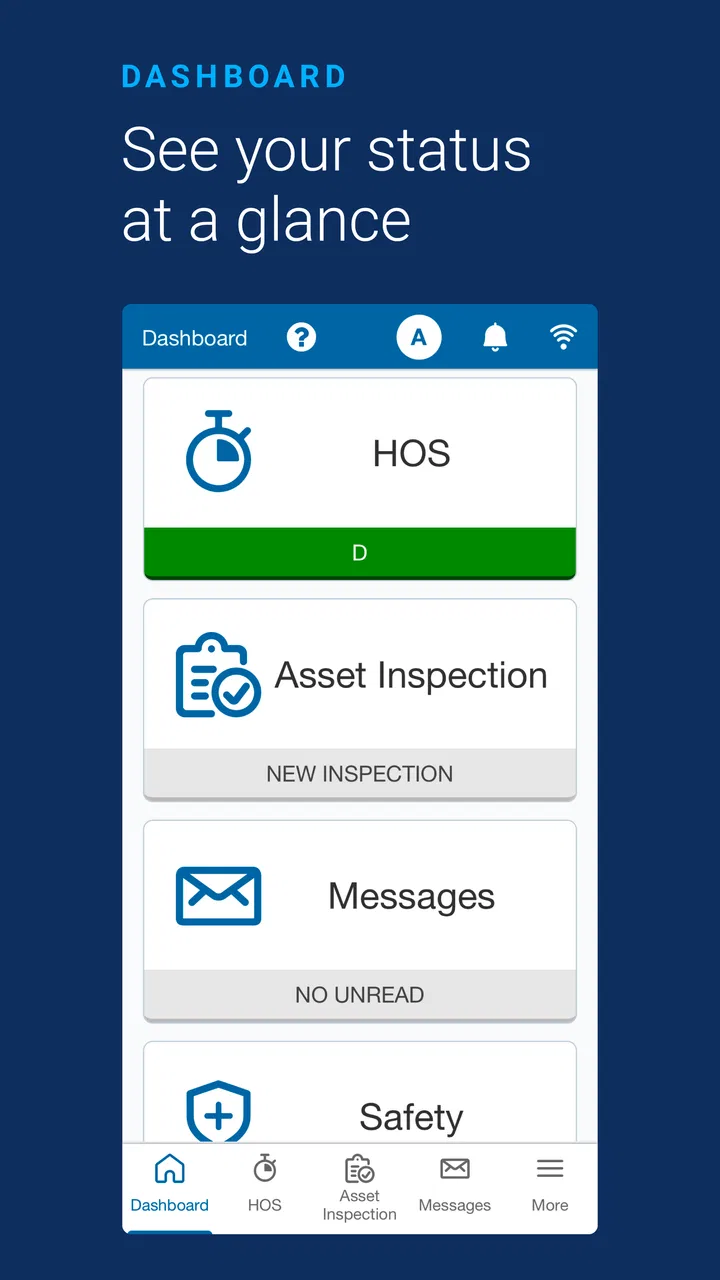
Geotab Drive is a mobile application designed for commercial drivers who use the MyGeotab fleet management platform. It helps drivers record hours of service, complete electronic logging device (ELD) duties, perform vehicle inspections, manage shipments or trips, and communicate relevant information to fleet administrators. Its exact features can vary depending on the company’s Geotab configuration, region, vehicle setup, and the permissions assigned to each driver.
02Does Geotab Drive require an account or company subscription?
Yes. Geotab Drive is generally intended for drivers working with a fleet or transportation company that uses compatible Geotab services. Installing the app alone does not normally provide access to its full functionality. You typically need login credentials supplied by your employer or fleet administrator, and the vehicle may need a properly installed Geotab GO device or another supported configuration. Contact your administrator if you cannot sign in or see expected features.
03Can Geotab Drive work without an internet connection?
Geotab Drive may support limited offline operation, allowing some information to be recorded when mobile connectivity is temporarily unavailable. However, offline capabilities and synchronization behavior depend on the app version, device configuration, and fleet settings. Data generally needs to sync once a connection returns, so drivers should not assume every feature will work offline. A stable internet connection and location services are recommended for normal use.
04Is Geotab Drive available for both Android and iPhone?
Geotab Drive is designed for supported Android and iOS mobile devices, although compatibility can depend on the operating system version, device hardware, and the requirements established by the fleet administrator. Before downloading, check the official Google Play or Apple App Store listing for current requirements. Companies may also restrict supported phones because functions such as Bluetooth communication, GPS, notifications, or background operation can affect performance.
05Is Geotab Drive difficult for drivers to use?
The app is built around common driver tasks such as changing duty status, reviewing logs, completing inspections, and managing work-related records. After initial setup and training, many drivers can use the main functions without much difficulty. Nevertheless, the experience depends on how the employer configured the system and how familiar the driver is with electronic logging rules. New users should complete company training and verify entries before submitting records.
Pros
- Streamlines driver vehicle inspections and defect reporting.
- Supports electronic Hours of Service and compliance workflows.
- Works with Geotab telematics data for connected fleet visibility.
- Can reduce paperwork and improve communication with fleet managers.
- Provides mobile access to assigned trips
- tasks
- and driver information.
Cons
- Requires a compatible Geotab fleet account and administrator setup.
- Some features depend on the vehicle’s installed telematics hardware.
- Users may need training to navigate compliance and inspection tools.
- GPS and background activity can increase battery consumption.
- App usefulness is limited for drivers outside managed commercial fleets.

Geotab Drive
Gallery